How to prepare an IDS
What you will actually do, stage by stage. About ten minutes for a first IDS, two or three after that.
-
10
Your details
Two minutes
One page holds everything you type, in the order the SB/08 asks for it: application number, filing date, first named inventor, art unit, examiner, docket number. Then your references, one per line — patent numbers, DOIs, arXiv IDs, PubMed IDs or full citations, mixed freely.
Already have the PDFs? Drop them on the box below the list. Each file name becomes a citation and the file is attached as that reference's copy.
Lower down: the timing statement, the 1.17(p) fee, who is signing, and the fee inputs. Practitioners are saved to your account, so you pick a name instead of typing it.
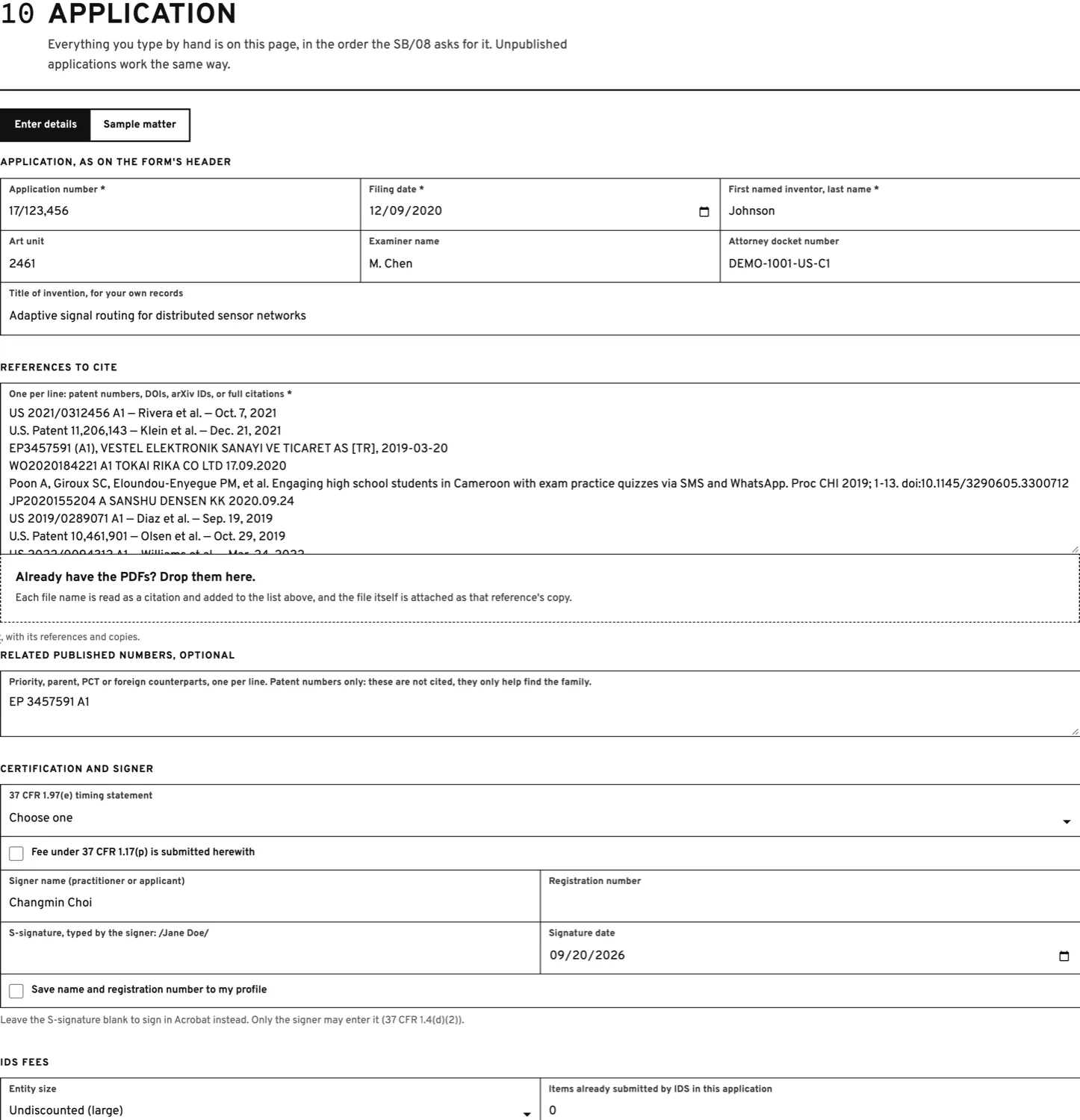
FIG. 6A — everything you type, on one page -
20
References
Runs by itself
The lookups start the moment you arrive. A line at the top counts them off while each row fills in: bibliographic data, the copy the rules require, an English machine translation of anything not in English, and a search of the patent family for art cited against your invention.
Each row ends in one of four states: Fetched, Not required (U.S. patents and publications need no copy), Paywalled (upload your subscription copy), or Not found (check the identifier).
Family suggestions are listed with who cited them and why. Tick the ones you want; nothing is added for you.
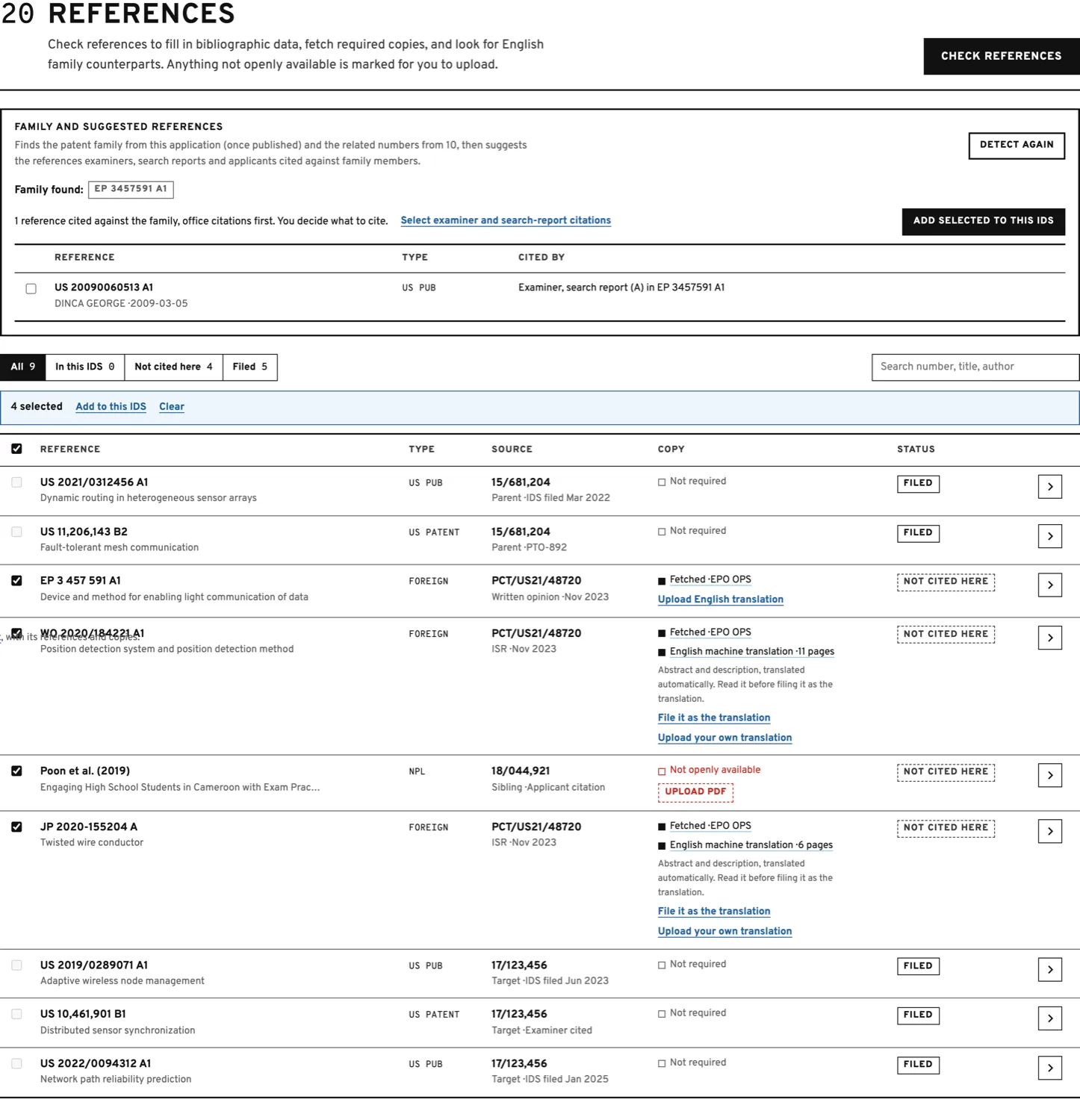
FIG. 6B — copies and family suggestions -
30
The form fields
Read it, edit anything
Every value that will be written into the SB/08, in the form's own sections. It is checked against the form's rules as you type: 8-digit application numbers, kind codes from MPEP 901.04, two-letter country codes, dates, name lengths. Where a source disagrees with what you entered, both are shown and yours is kept.
-
40
Generate
One look, then go
A summary of what is about to be written — counts by section, your timing statement, the fee option, the signature and the signer — with the fees worked out and their USPTO fee codes. Nothing to tick. Press Generate SB/08; this is where a credit is spent, once per IDS.
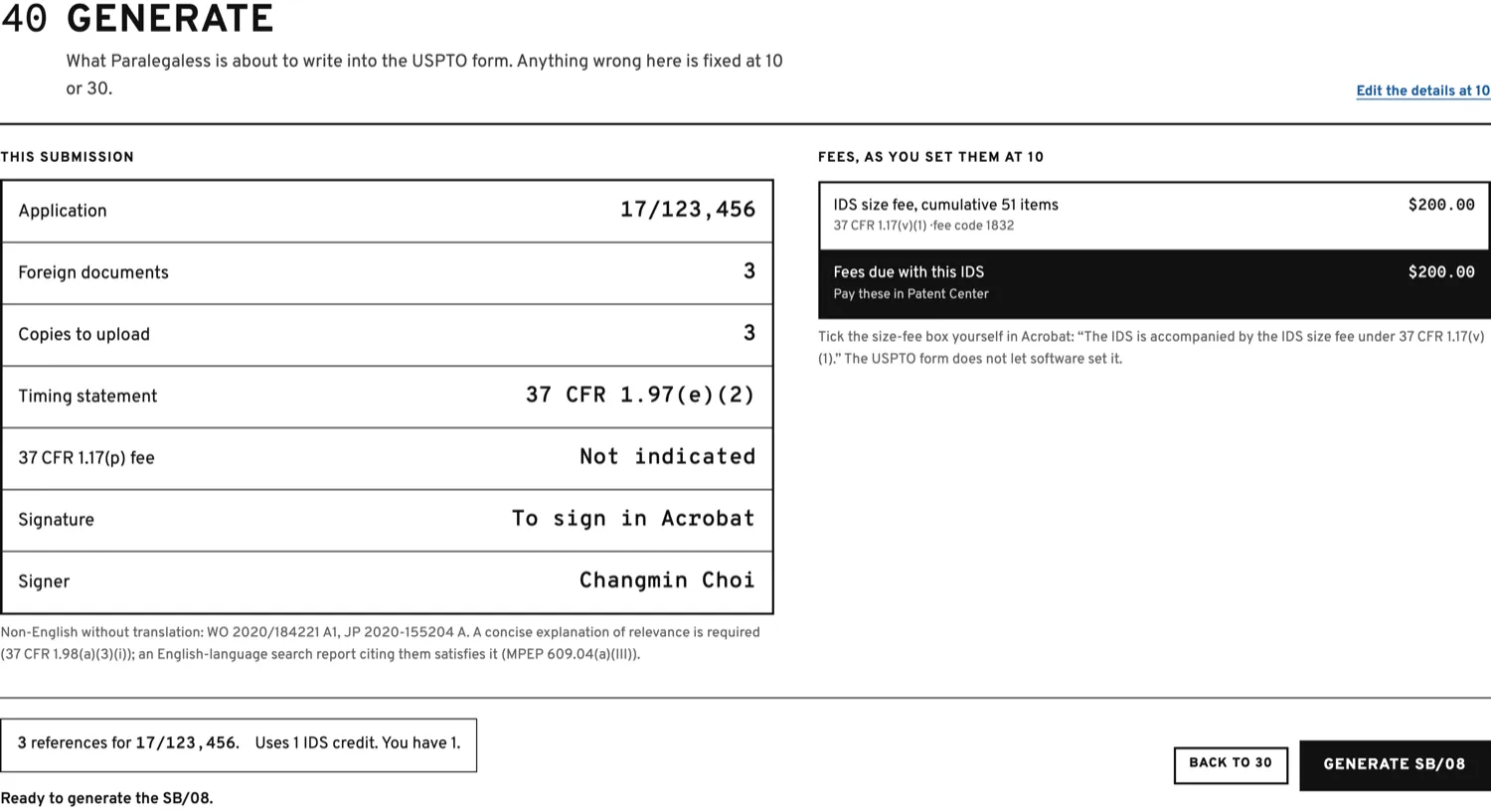
FIG. 6C — the review before generating -
50
The packet
Two files to upload
The filled SB/08 on the left, the merged reference copies on the right, each with its download, plus an Excel sheet for your docketing system. A reading copy of the whole IDS is linked below for your file.
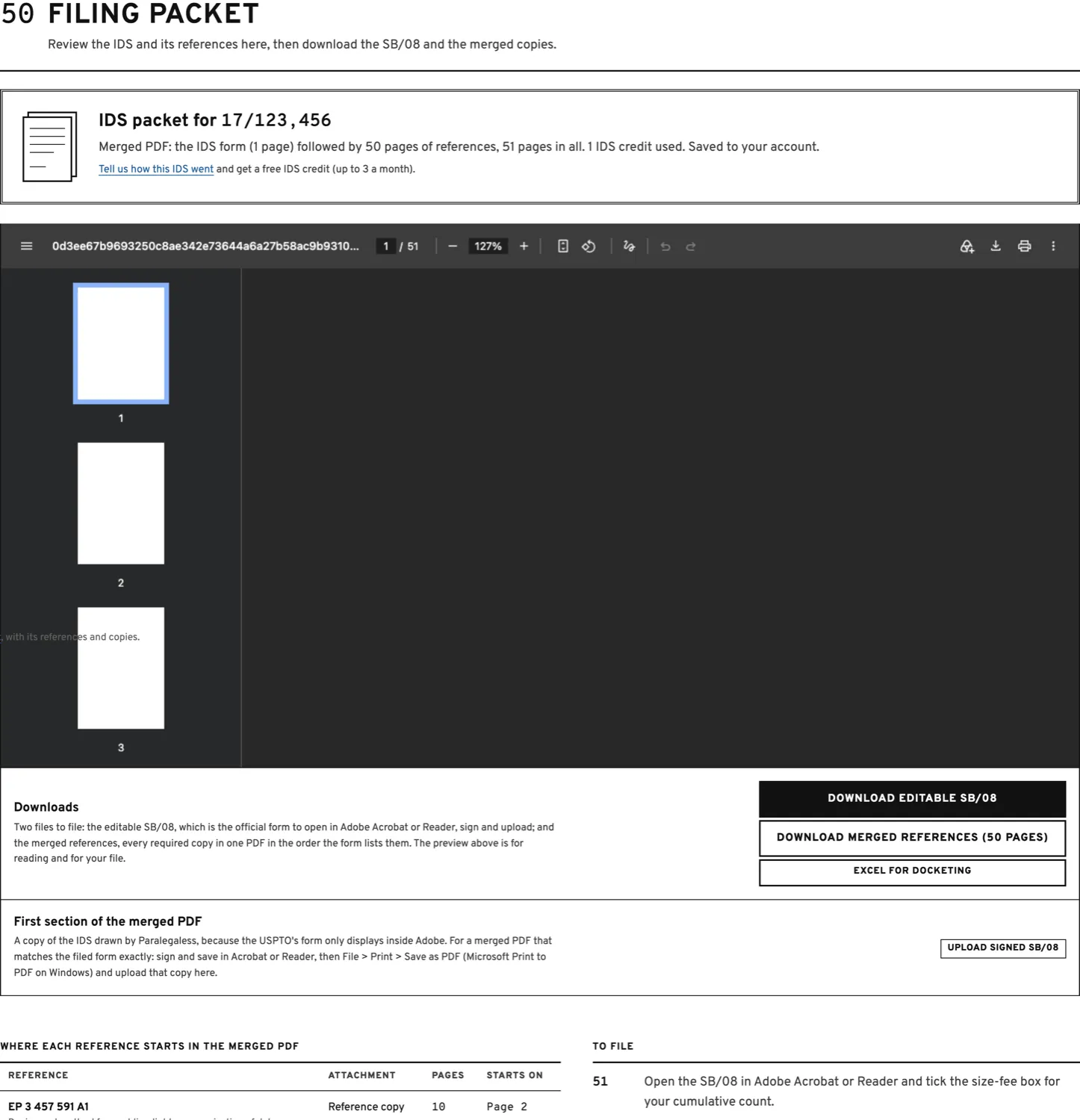
FIG. 6D — the filing packet -
60
Filing it
In Patent Center, by you
Open the SB/08 in Adobe Acrobat or Reader — no other viewer can draw it. Tick the size-fee box if one applies, sign if you left the S-signature blank, and save; the save right is intact. Then upload the form and the merged copies in Patent Center and pay the fees shown at stage 40.
What it costs
You are charged once, when the SB/08 is first generated. Looking things up, fetching copies, translating, editing and family detection cost nothing, and edits and re-downloads within 30 days are free.
| What | Fee | Notes |
|---|---|---|
| First IDS | Free | One credit on sign-up. |
| One IDS | $35.00 | One credit. They never expire. |
| Pack of 5 | $175.00 | $35.00 each. |
| Pack of 10 | $300.00 | $30.00 each. |
| Pack of 30 | $780.00 | $26.00 each. |
| Feedback | Free | One credit per review, up to 3 a month. |
USPTO fees are separate and paid to the USPTO. Payments here are handled by Paddle; receipts come from Paddle by email. Every IDS stays in your account with its references and copies, and a continuation reuses them without fetching anything again.
What it will not do
These limits are deliberate. They are where your judgement, and your signature, belong.
- It does not file. You upload the packet in Patent Center yourself. Paralegaless never asks for your USPTO.gov login.
- It does not decide what to cite. Materiality, the timing statement under 37 CFR 1.97(e), and what goes in are yours.
- It does not sign. You type your S-signature each time. It appears in the stored generated PDFs, but is cleared from the editor and is not saved as a reusable profile value.
- It does not tick the size-fee box. The USPTO's form does not let software set it; tick it in Acrobat.
- It does not bypass a paywall or a licence. Closed-access papers are marked for you to upload.
- A machine translation is not a certified translation. Read it before you file it, and file your own where one is required.
- It is not a law firm and gives no legal advice. Every IDS is reviewed and signed by the practitioner who files it.
If something looks wrong
The SB/08 says only "Please wait…" — explanation
The USPTO's SB/08 is a dynamic XFA form. Only Adobe Acrobat and Adobe Reader can draw it; every other viewer, including Preview, Chrome and Edge, shows that waiting message no matter what is in the file. Open it in Adobe and your data is there. This is also why the merged PDF starts with a drawn copy of the IDS: a copy of the form's pages would carry only the waiting message.
Adobe says "Cannot Save Form Information" — explanation
That means the file lost its usage rights. Files from Paralegaless keep them: the original form is preserved byte for byte and the data is appended. If you see this, you are probably working on a copy that another tool re-saved. Download the SB/08 again from stage 50 and open that one.
A reference could not be fetched — explanation
Look at what the row says. Paywalled means the journal publishes no free copy at all — that is the normal answer for most journal articles, and the only fix is to upload the PDF your subscription gives you. Nothing is broken, and the bibliographic data is still filled in for the form. Not found means the identifier itself was not recognised: check the DOI or the number. Paralegaless never works around a paywall or a licence.
The lookup disagrees with my citation — explanation
Both are shown and your value is kept. Nothing is overwritten behind your back. Edit the field at stage 30 if you want the other one.
The size fee box is not ticked — explanation
It cannot be. That checkbox is not bound to data in the USPTO's form, so no software can set it. The merged PDF tells you which statement applies and your cumulative item count; tick the box yourself in Acrobat before filing.
The download button does nothing — explanation
Check that the browser is not blocking downloads from this site, and that no reference still shows a red "upload needed": the packet waits until every required copy is attached.
Getting help
Write on the message board on the home page, or from Account > Messages if you are signed in. Replies appear in the same place. There is no support email to chase.
If something in the IDS looks wrong, say which application and which reference and the answer will be faster.